
Companion App for Metal Gear Solid V: The Phantom Pain now available
A companion app to be used with Metal Gear Solid V: The Phantom Pain is now available for free through iTunes and the Google Play Store.
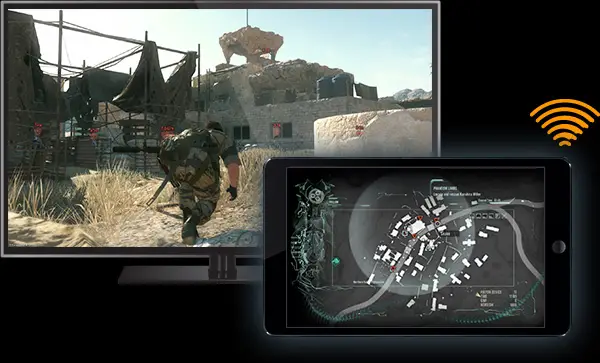
From the official website:
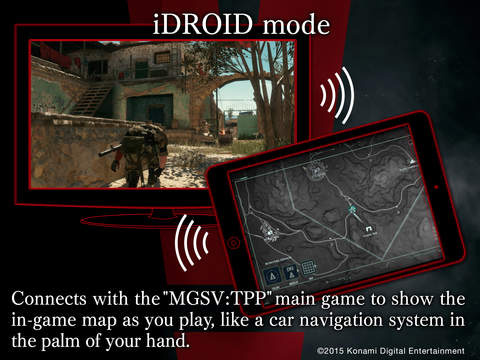
Installing the dedicated Companion App released alongside “METAL GEAR SOLID V: THE PHANTOM PAIN” allows devices such as your smartphone or tablet to act as your very own iDROID.
Ordinarily, bringing up the iDROID in-game blocks most of the on-screen action, so using your device as a second screen means that you can execute your mission while using the various iDROID features on the go.
Aside from using the app as your iDroid, you can also use certain features while you’re away from the game, such as listening to music tracks and cassette tapes obtained in the game.
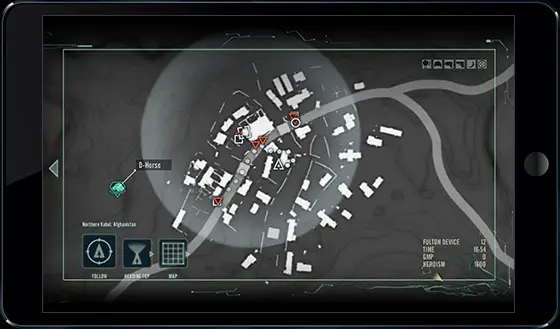

The app will work with the Xbox One, PlayStation 3 and PlayStation 4 versions of the game.
Source: MGSV Official Website, Web Manual
Installed.
Who else is gonna have someone else to use this app while You play? 🙂
Who else is gonna have someone use this app while they watch You play? 🙂
nice idea!
Im having problems installing, it says package file not signed correctly, idk what it means but my phone meets the requirements
I cannot even download it. It says that it is not compatible with my device. I have an Iphone 5C
Me too, apparently only works for 5s and higher, bit disappointed. I’m also getting the package file not signed correctly error on my android tablet.
I don’t understand because I have the GZ app. Why did they make it different?
I don’t know. Maybe they made it more graphic heavy, since it’s a lot more, and I do mean a lot more, data to show. Since PP is like a thousand times bigger than GZs maybe with data compression and blah blah whatever it requires better hardware. I don’t know, I’m just grasping at straws here.
i also get that same error from my sony android cellphone, wtf… will they fix this?
Same on the iPad 4! Ground Zeroes worked though
try Zipsinger app to install it
I have the same problem both on my phone and tablet. Anyone else?
try Zipsigner
Uhh… how is this not compatible with my Iphone? I even made sure to update it before hand.
Compatible with Iphone 5S, 6 and 6Plus. It doesn’t work with Iphone 5 =/
In my country is not available yet. Thats what I deserve for living in a poor third world country.
I just want to say that I played the game even with my download at 19gb. The cuts in the beggining are very against immersion. My feelings. And I was expecting like a year for snake to be able to get back to the fight.
If I got it right, you use your iDroid to manage about everything in the game, it states that the app act as the iDroid, so, can you really manage MB and such things with the app?
I haven’t really gotten around to testing it much, but it does let you give certain commands to buddies, and call in choppers atleast, so there’s atleast a chance 🙂 I’ll try to remember posting back with an answer when I get back home again 🙂
Thanks 😉
The cassette feature will come in soooo handy. I need all my senses when playing so I can’t listen to the story. This app will let me catch up at the gym.
Not avaiable for iphone 5c damn
I JUST CRIED ! Don’t ask me why ?
dont know why but this shit is cool af
Got it on my Nexus and Iphone but don’t have the game yet to try it out. I did find it a little strange that it appears to have less menu options than the MGSV GZ app but I guess thats just because you don’t need a MB mini-game. I also noticed on the preview images for one of them it says ‘works with MGSV: GZ’ instead of TPP. Thought it was a phishing app at first b/c of it but just a misprint I suppose.
Not compatible with my iPad or my iPhone, the Ground Zeroes app works perfectly for both of them 🙁
TPP and a new meme card/PSU. Christmas came early this year.
Apparently it doesn’t work on standard iPad or iPad 2
Does it need lollipop? Im still with 4.1
All I get is “Please and then start connecting the game body to online” what am I doing wrong?
I see the companion app briefly flash ont PS4 screen as connected only to see the disconnected status right after 🙁
I’m having a problem downloading the 700mb map.. do I need to do something before doing it? Installed the app just fine on my android phone.. asus zenfone 5
A moment of silence for my Windows Phone comrades.